That one was surprisingly easy, then hard, and eventually pretty easy again.
In most GUI-frameworks, I think, one could have just used the normal text-on-canvas functions to draw some text on top of the OpenGL canvas. At least that’s what I had expected.
Well, it doesn’t really work that way in Racket’s GUI framework. So, text rendering in OpenGL it is.
Some googling later, I was horrified – the way one renders text in OpenGL is basically the following:
- obtaining a bitmap of the text
- converting that to a texture
- mapping that texture onto an object
- rendering the object
But I figured I had no choice. Off to Racket’s documentation (which is excellent, by the way) for point one on the list: obtaining a bitmap with text on it.
That’s really easy in racket:
(let* ([text-target (make-bitmap 200 200)]
       [dc (new bitmap-dc% [bitmap text-target])])
  (send dc draw-text "hello, world!"))
All right, now – how can I convert that to an OpenGL texture? Turns out, I don’t have to. There’s a handy function which directly converts that bitmap into an OpenGL display-list – ready for rendering.
(gl-call-list (bitmap->gl-list text-target))
So, at the end of the day, that was quite easy. It’s not perfect (the letters look pretty bad and turning on font-smoothing only makes it worse) but good enough for now. And there’s an up-side: the text-holding object behaves like any other 3D object in the scene, now. It can be textured, reacts to the scene’s lightening, etc.
Screenshot:
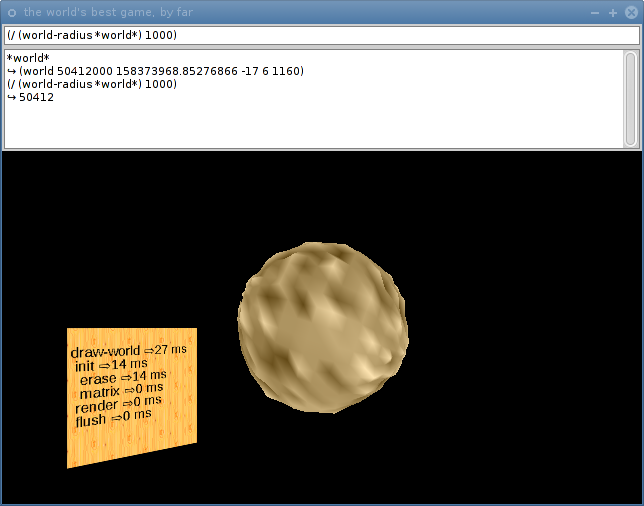
(Please ignore the ugly wood-panel background, that’s only there because it was easy to do.)



Leave a Reply